
What my work is
Open, Later, Done and Drafts - the view that separates what needs you from everything else moving through your mailboxes.
Last reviewed
My work sits at the top of the sidebar and holds only the conversations that are yours to act on, pulled out from every mailbox you can see so you never have to check them one by one.
Open
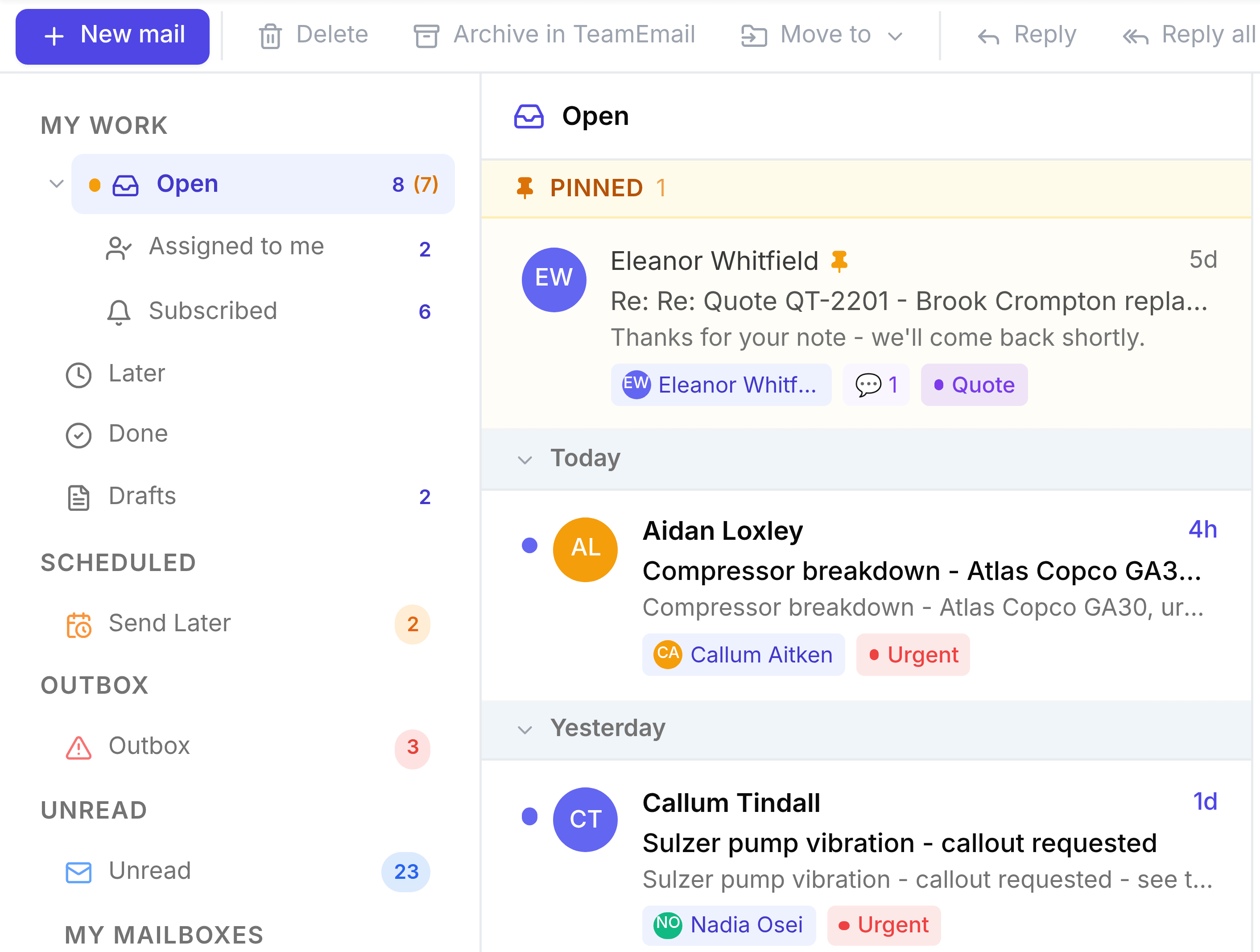
Open is a master row rather than a list of its own: it's the sum of two rows nested underneath it, Assigned to me and Subscribed.
Find your way around My work
- Assigned to meEvery conversation put in your name, by you or by a teammate.
- SubscribedConversations you're following without owning them.
- LaterConversations you've snoozed, or set to Waiting while you follow them.
- DoneConversations you follow that have been marked done.
- DraftsEvery email you've started and not yet sent, across every mailbox.
Reading the badges
A conversation with unread activity carries a blue dot in the list. In the sidebar, Open carries an amber dot and an amber count in brackets beside its indigo total: 12 (3) means twelve open, three of which you haven't read yet. Later and Done show an amber dot with no count when something in them has changed since you last looked.