

A Shared Mailbox for Your Team

TeamEmail is the shared mailbox customers write to. Every conversation has an owner, a status and internal notes, and replies share a signature.

30-day trial. No card needed.

Customer email becomes your whole team’s job

Four colleagues in business clothes, seen from above, standing together over a clipboard and a printed chart in a bright office lobby.
  • Shared inbox
  • Assign an owner
  • Internal notes
  • @mention a teammate
  • Open, Waiting, Done
  • Snooze and follow up
  • My Work

What TeamEmail covers

Assignment, internal notes, templates, signatures, snooze and scheduled send all have a place here. A thread can also raise a quote or a customer, and that record keeps the reference back to where it came from.

9:41
app.sorviai.com/teamemail

Billing

TeamEmail, priced for the organisation

Choose a plan below, or compare plans.

Per user

Flexi

Per-user pricing, for the users you pick

£4

/ user / month, billed annually

  • Suited to personal and small businesses
  • Priced per user, starting from a single user
  • Add or remove users at any time
  • TeamEmail, with roles and permissions for every user
  • Two-factor authentication and an audit trail
Every employee

Most popular

All teams

One plan for every employeeSave 55%

£1.80

/ user / month, billed annually

  • Suited to professional teams
  • A minimum of 5 users, set for your organisation
  • Declare your headcount, then add employees as you grow
  • TeamEmail for every employee
  • Two-factor authentication and an audit trail

Custom

Enterprise

A bundle and terms shaped around you

Custom

price

  • Suited to organisations that need to scale
  • Choose the applications and user counts you need
  • Data import and migration with our team
  • Guided onboarding for every team
  • Your own domain

How it helps

Your inbox grew. The way you answer it did not.

Service Desk

6 unowned
  • Daniel OkaforFwd: Fwd: chiller not holding temperature

    Every customer email lands with you
    3dNo owner
  • Amara BelloRe: Re: service visit dates?

    The team asks if anyone has replied yet
    2dNo owner
  • Tom HaleFwd: Re: Fwd: invoice query

    Context lives in your head and in forwarded chains
    5dNo owner
  • Hannah ColeRe: quote for spare parts

    Follow-ups depend on someone remembering
    9dNo owner
  • Ravi ShahTo james@ (left in June): delivery change

    When someone leaves, their inbox leaves with them
    6wNo owner
  • Grace LinWarranty claim

    Nobody can see who is handling what
    4dNo owner

Inboxes

My work and shared inboxes

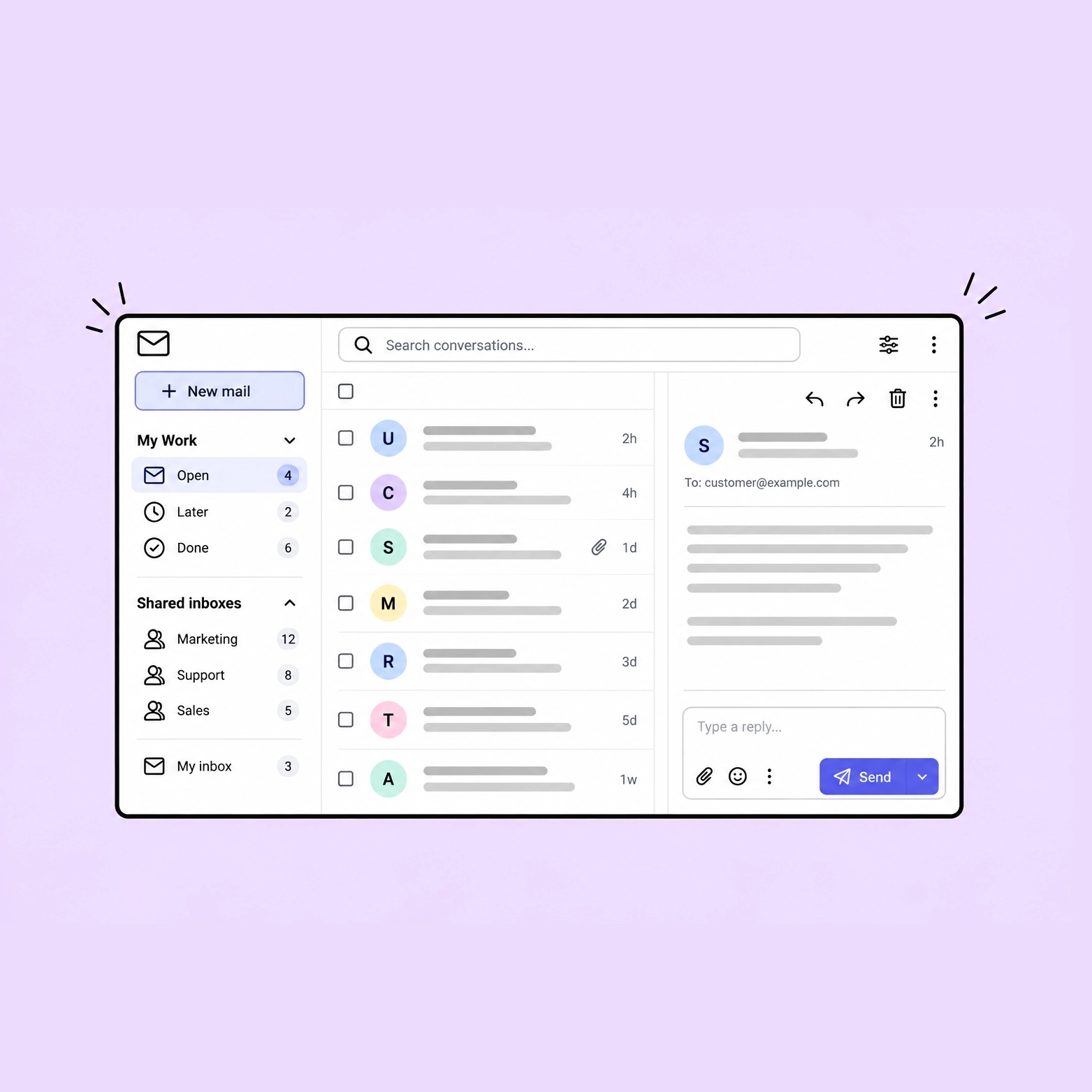
Every conversation assigned to you collects in My Work, sorted by where it stands. A shared inbox belongs to the team, and your own inbox sits in the same sidebar beside it.

My Work, sorted by state
Open is what is waiting on you right now, Later is snoozed or waiting on somebody else, and Done is answered, closed or archived - the three groups the sidebar sorts into.
A shared inbox belongs to the team
Everyone given access works the same queue, so a conversation is picked up by whoever is free rather than forwarded on to whoever might be.
Your own inbox is in the same sidebar
A private inbox and the team mailboxes are listed together, so a working day takes one application.

Collaboration

Live chat inside the thread

Who has a conversation open and who is typing in it both show as it happens, and an internal note reaches everyone watching the thread the moment it is saved. The customer sees only the replies actually sent to them.

Who has it open, and who is typing
The people viewing a conversation are listed on it while they are there, and a colleague part way through an answer shows before the reply does.
A note arrives live, and threads
An internal note reaches everyone with the conversation open as it is saved, and a reply to that note opens its own thread beneath it.
@mention brings a colleague in
Naming somebody in a note subscribes them to the conversation and notifies them in the same moment.

Channels

Multiple channels in one inbox

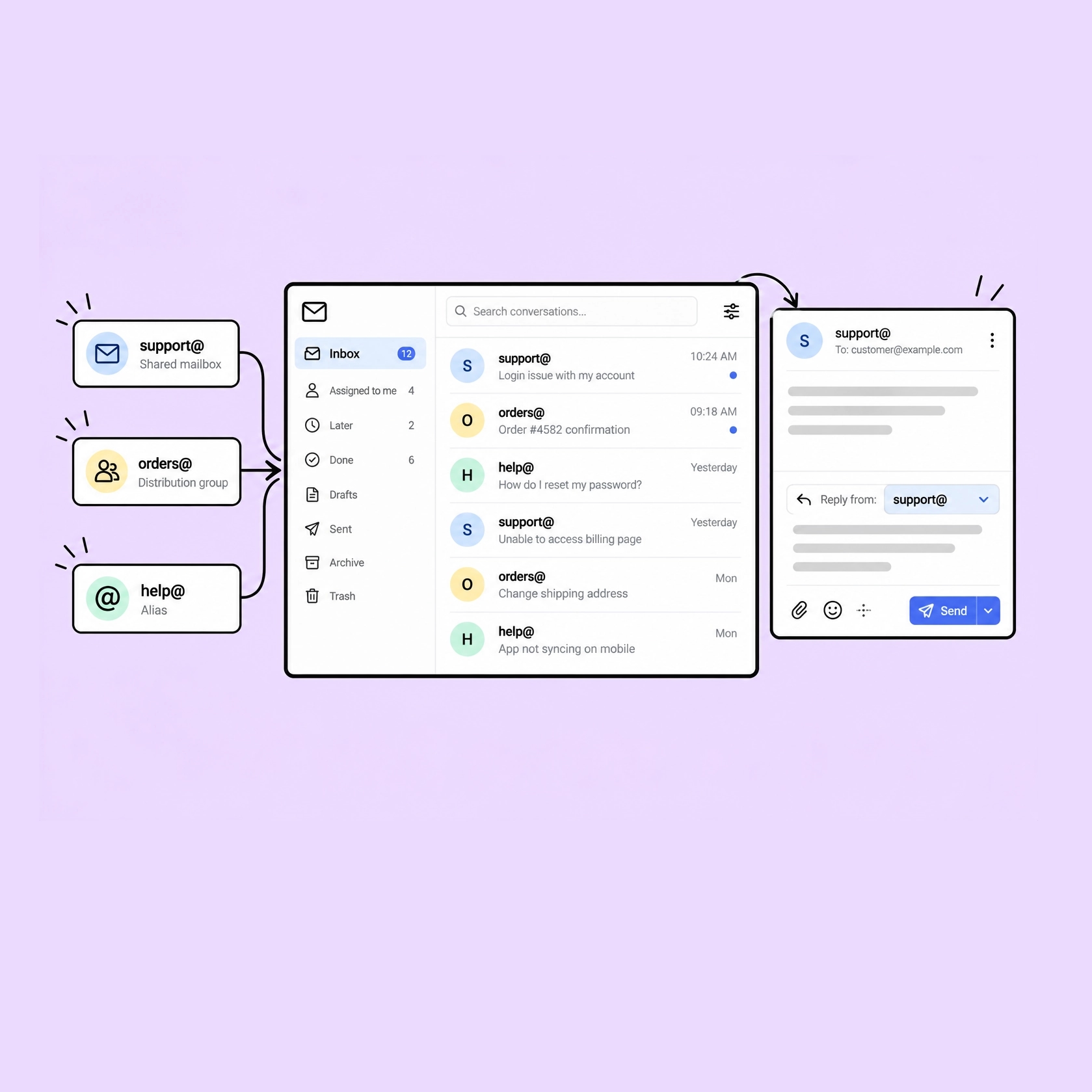
A shared mailbox, a distribution group and an alias can all point at the same inbox, which reads them as one list. A reply leaves from the address the mail arrived on.

Every channel feeds one list
The inbox reads every channel assigned to it as a single unified list, in one place rather than one tab per address.
A mailbox, a group or an alias
support@ can run as a shared mailbox, orders@ as a distribution group and help@ as an alias, and each is a channel the same inbox holds.
The reply leaves from the right address
A conversation keeps the channel it arrived on, so the answer goes back out from that address, under the signature set for it.

Assignment

An assignee on every conversation

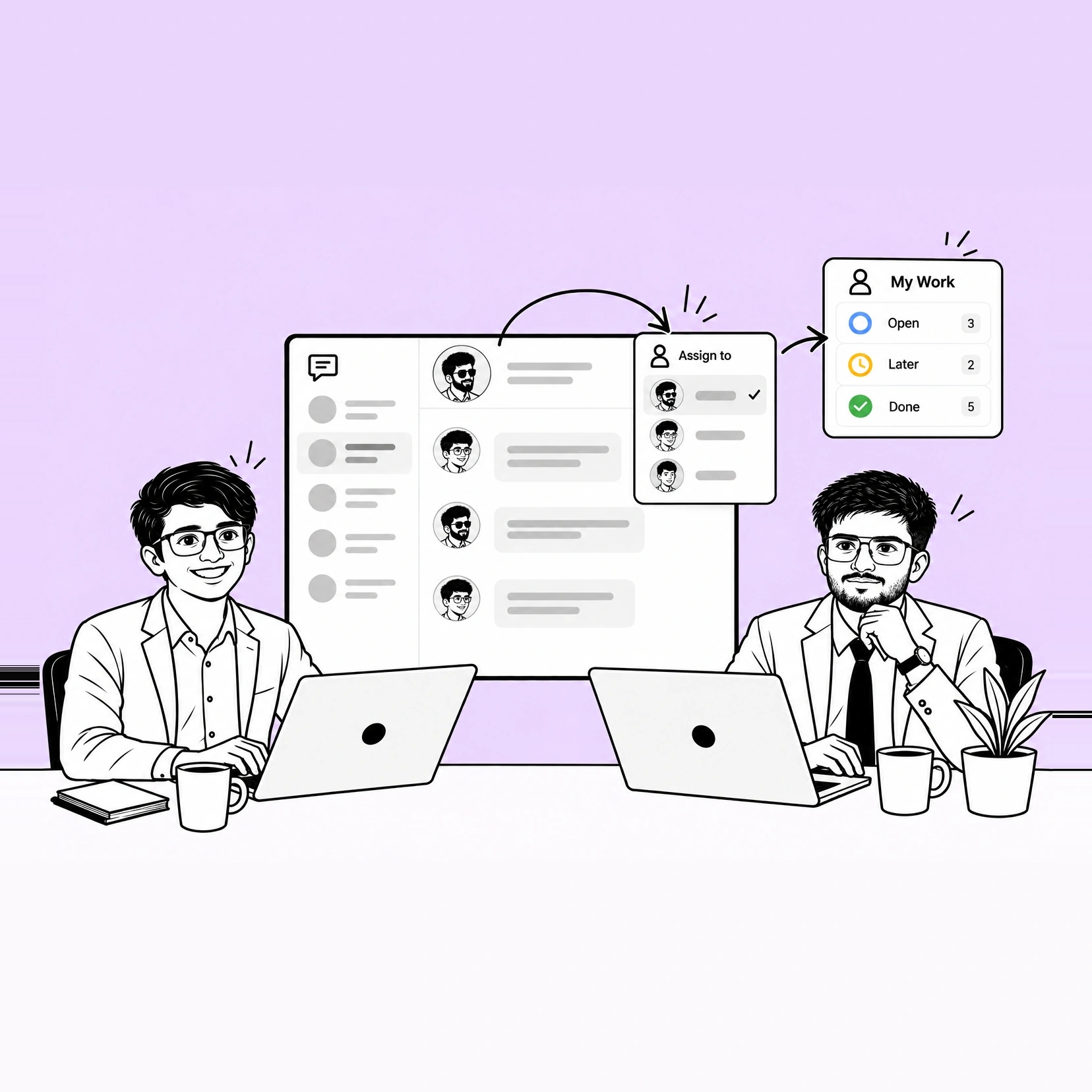
Taking a conversation puts your name on the record and moves it into your My Work. The rest of the team can see who holds it, and handing it on moves it just as fast.

Taking it puts it in your My Work
An assigned conversation joins the assignee's own list, where its state decides whether it sits under Open, Later or Done.
The team can see who holds it
Ownership sits on the conversation itself, so whose it is reads off the record rather than out of somebody's memory.
Handing it on is one move
Reassigning a conversation moves it into the new assignee's My Work, carrying the thread, the notes and the state with it.

FAQ

Questions about TeamEmail

Answer every customer from one shared inbox

Connect a shared address and work it for a week.

30-day trial. No card needed.